 Deputy
Agent tool
Developer preview
Deputy: Any web page, one typed call.
Deputy is an agent that lives in your browser. Any MCP client, such as Claude Code, Codex or Cursor, asks Deputy instead of driving the browser itself. It gets back a typed API for the page you're on, and Deputy makes the call in your real, logged-in session.
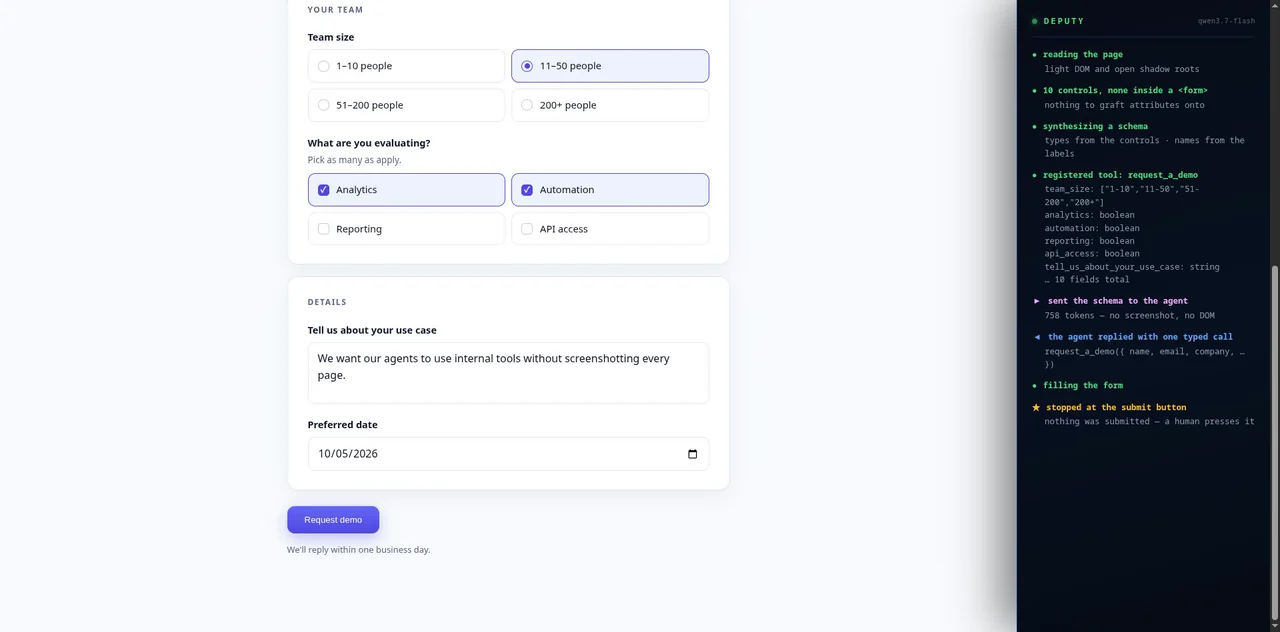
The browser already knows the schema.
A form knows that a field is a required date, that a dropdown has three options, that a number must fall between 1 and 12. Agents usually throw that away by rendering the page to pixels, then pay a model to guess it back.
WebMCP, a W3C standard shipping in Chromium, lets a site declare its forms as tools. Almost no site has adopted it, so Deputy adopts it on their behalf: it writes four attributes onto the page's own form, and Chromium generates the JSON Schema and runs the submission.
<!-- what Deputy writes onto the page -->
<form toolname="book_a_table" tooldescription="…">
  <input name="party_size" type="number"
         min="1" max="12"
         toolparamdescription="Party size">
What the agent receives
// generated by the browser, not by Deputy
{ "party_size": { "type": "number", "minimum": 1, "maximum": 12 },
  "date":       { "type": "string", "format": "date" },
  "seating":    { "type": "string",
                  "enum": ["indoor", "outdoor", "bar"] } }
Where the tools come from.
Tools the app already declared
Apps built with CopilotKit publish frontend tools to the same WebMCP registry. Deputy exposes them to any agent, fully executable.
Real forms
Deputy adds toolname and description attributes to the page's <form>. The browser generates the schema and performs the call.
Everything else
Where there's no <form>, Deputy builds the tool from ARIA widgets: radio groups and listboxes become enums, checkboxes booleans, editable text strings.
One form, two ways.
Filling a seven-field booking form. Same prompt, same data, both through claude -p. Both succeeded.
| Claude + Playwright MCP | Claude + Deputy | ||
|---|---|---|---|
| Turns | 9 | 6 | |
| Claude tokens | 216,888 | 133,366 | 1.63× fewer |
| Deputy's own model | — | 1 call · $0.000014 | |
| Total cost | $0.2730 | $0.1861 | 1.47× cheaper |
| Wall clock | 26.1 s | 17.2 s | 1.52× faster |
Tokens per observation of one page
- Full accessibility tree215,495
- Screenshot (PNG)57,134
- Trimmed accessibility snapshot (Playwright MCP)14,170
- Deputy on a form page611
Source: docs/measurements.md
It never submits for you.
On any form that changes something, Deputy withholds WebMCP's auto-submit. Chromium fills the fields, focuses the submit button and waits for a person to press it. Execution stays in the page's own security context, and no cookies are copied.
- browser_capabilities
- browser_invoke
- browser_ask
- browser_read
- browser_navigate
- delegate_goal
A developer preview, said plainly.
- Needs Chromium or Chrome 152+ with the WebMCP testing flag enabled.
- A local Bun daemon serves one MCP endpoint on 127.0.0.1:7331; an MV3 extension connects to it.
- Not on the Chrome Web Store yet. Installing takes a terminal.
- Not built yet: the A2A wire format and memory across page navigations.
Source-available under the PolyForm Shield License 1.0.0.
Give your agents the page, not a picture of it.
Deputy works with Claude Code, Codex, Cursor and any other MCP client.